Mac app for local AI context
Reusable AI context, owned on your Mac.
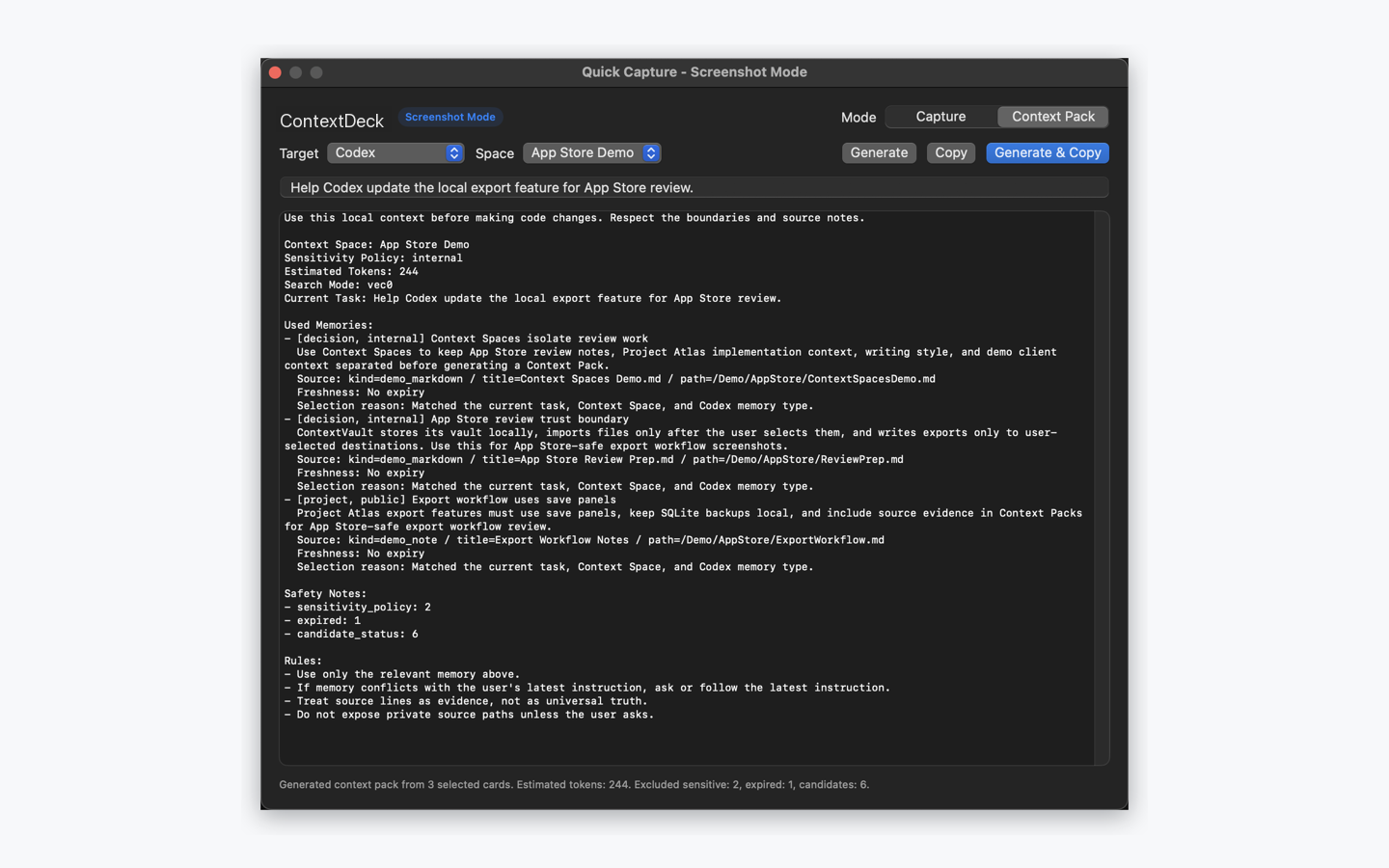
ContextDeck helps you capture notes, chat export snippets, Markdown, and Obsidian content, review candidate memories, and create focused Context Packs you can paste into ChatGPT, Claude, Codex, and Cursor.
What problem does ContextDeck solve?
AI tools are useful, but users often have to repeat the same background, constraints, writing style, project facts, and sensitive boundaries every time they start a new task.
Stop repeating prompts
Save reusable project background, decisions, writing style, and recurring constraints as local memory cards on your Mac.
Review before remembering
New extracted memories enter the Candidate Inbox first. You edit, approve, or archive them before long-term use.
White-box memory
Each memory keeps source kind, title, path, sensitivity, type, and expiry so you can see where it came from.
Keep context separated
Context Spaces separate project, client, writing, code, and personal areas to reduce accidental context mixing.
Filter sensitive data
Private and restricted memories are excluded from Context Packs by default.
Copy-ready Context Packs
Generate concise context for the current task and target AI tool, then copy it into your next prompt.
How it works
1. Capture or import
Use Quick Capture, create memory cards manually, or import user-selected ChatGPT exports, Markdown files or folders, and Obsidian vaults.
2. Review candidates
Candidate memories can be edited for title, kind, sensitivity, expiry, Context Space, and source details before approval.
3. Select the right space
Choose a Context Space such as a project, client, writing area, or codebase.
4. Generate context
ContextDeck builds a compact Context Pack you can copy into ChatGPT, Claude, Codex, Cursor, or another AI workflow.
Mac App Store v1 scope
The Mac App Store version focuses on a local context vault, Quick Capture, Candidate Inbox, Context Spaces, and copy-ready Context Packs. The App Store build is designed without a required account, cloud sync, telemetry, third-party analytics, or external AI API uploads.
Imports start from files or folders selected by you through macOS file panels. Exports are written only to user-selected destinations. The advanced MCP Developer Bridge is not included in the Mac App Store build.
Own your AI context.
For ContextDeck support, privacy requests, or App Review questions, contact support@tonkleyinnovations.uk.