Mac productivity app
Find the file you remember — but can't remember where you saved.
DeskRecall builds a private local index of your chosen folders, so you can search by what you remember: a phrase inside a screenshot, a client name in a PDF, or a vague note from last week. Everything stays on your Mac.
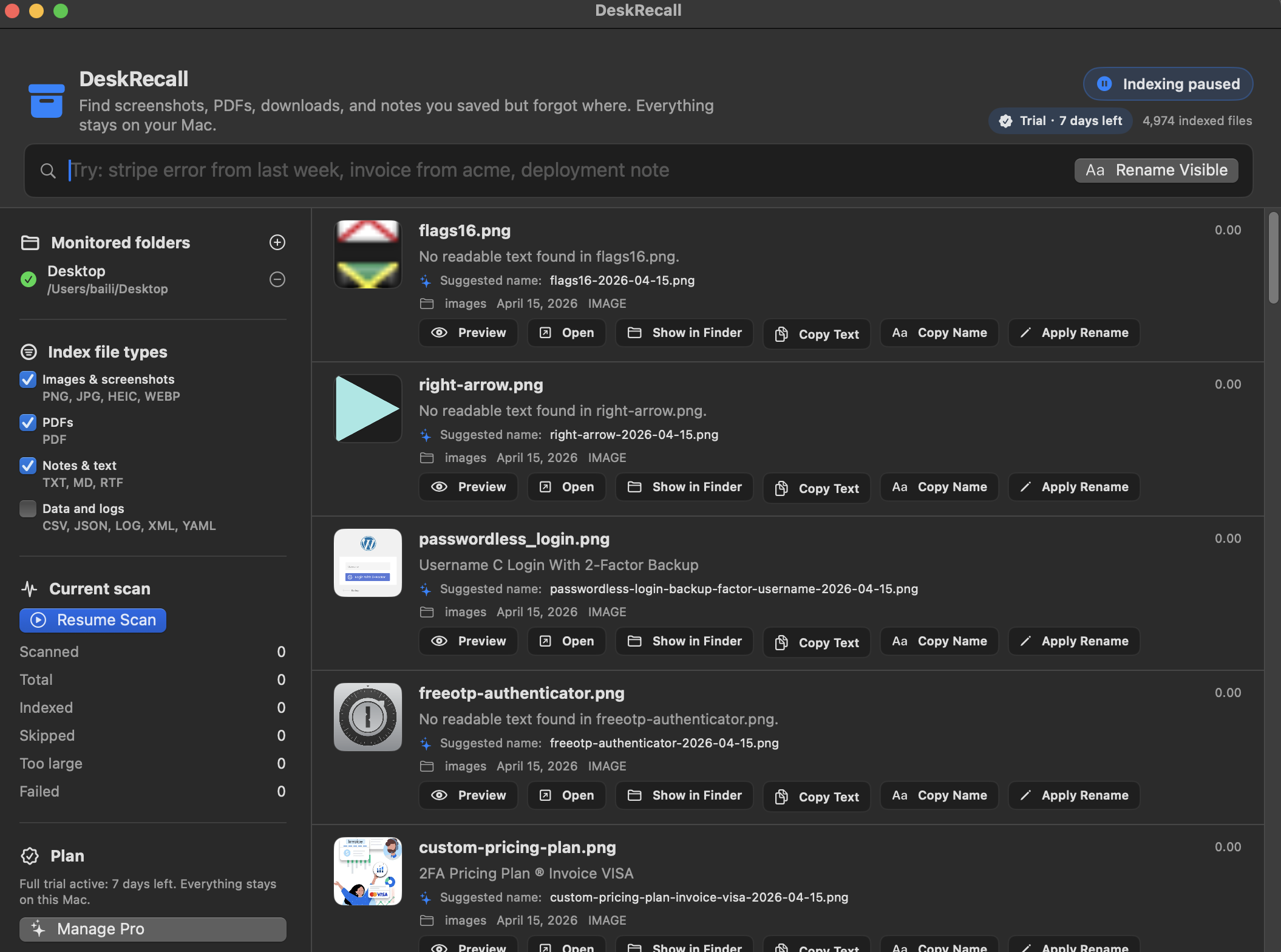
Built for the moment you remember the file, but not where it is.
DeskRecall reads and indexes the folders you choose, then lets you search across filenames, extracted text, OCR, and summaries at once.
OCR for screenshots & PDFs
Find words captured inside screenshots, scanned documents, receipts, invoices, and saved PDFs — not just filenames.
Natural-language search
Search with phrases like “invoice from last month” or “screenshot with the login error” and get ranked local results.
Local-first index
Choose exactly which folders to index. The searchable database is created and kept on your Mac.
Smart rename & batch rename
Turn vague downloads and screenshots into readable filenames, one at a time or across visible results — with Undo.
Preview & fast actions
Preview, open, reveal in Finder, and copy extracted text — all from the results list, without leaving DeskRecall.
Private by design
No cloud sync, no remote file storage, no required account, and no file uploads. Your index never leaves your device.
Made for people who save a lot on their Mac
Developers
Find that error screenshot, config snippet, or log you saved three sprints ago.
Freelancers & consultants
Locate a client invoice or contract by a name or amount you remember.
Researchers & students
Search across saved PDFs and reading notes by a phrase, not a filename.
Anyone who lives in Downloads
Rescue the receipt, boarding pass, or screenshot buried under months of saves.
Pricing
Start with a 7-day full trial. Keep a useful free tier afterward, or unlock everything with Pro.
- Recent files & basic filename search
- Up to 300 indexed files
- No account, no uploads
- Unlimited indexing
- OCR & PDF text search
- Natural-language search
- Smart rename & batch rename
- Index Manager
- Everything in Pro
- One-time launch price
- No recurring subscription
Prices shown in USD; local App Store pricing may vary. Subscriptions renew automatically unless canceled at least 24 hours before the end of the current period.
Frequently asked questions
Does DeskRecall upload my files anywhere?
What file types can it search?
Which folders does it index?
What do I get during the trial vs. the free tier?
What are the system requirements?
Everything stays on your Mac.
DeskRecall processes selected files locally. If you have a question about privacy, indexing, or a specific file that failed to index, we're happy to help.